
Streamline Team Communication with ChatWork
The developer did not provide additional system requirements.
Overview
ChatWork is a desktop application designed to enhance team collaboration by replacing traditional email with a streamlined group chat interface. It addresses common productivity challenges such as email overload, message irrelevance, and delayed task tracking. By integrating messaging, task management, and file sharing into a single platform, ChatWork enables teams to communicate more efficiently and stay aligned on project goals.
The software is tailored for professionals and teams in creative, project-based, or remote work environments who rely on constant communication and real-time collaboration. Its core value lies in simplifying workflows through structured, context-rich conversations that reduce noise and improve response times. Real-world use cases include marketing teams coordinating campaign launches, developers tracking bug fixes, and remote teams managing daily stand-ups.
The application supports cross-device access, allowing users to stay connected whether they’re at a desk, on a laptop, or using a mobile device. The developer did not specify the target audience beyond general professional use.
Key Features & Capabilities
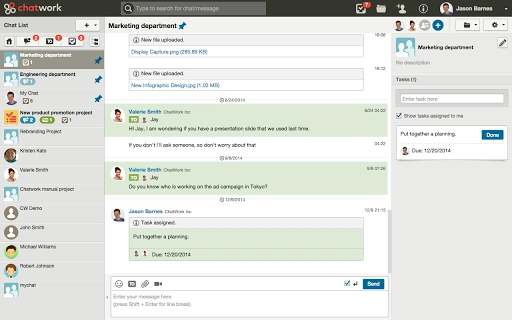
- Group Chat with Mention System – Users can initiate real-time group conversations and tag specific members using the @ symbol, ensuring that relevant individuals are notified and messages remain contextually accurate. This feature reduces the risk of missed communications, especially in fast-paced environments.
- Task Assignment and Tracking – Team members can assign tasks directly within chat threads, set due dates, and mark them as completed. Upon completion, all group members are automatically notified, maintaining transparency and accountability.
- Cloud-Based File Sharing – Users can upload files up to 5GB and share them instantly within group chats. Files are stored securely in the cloud, accessible anytime and from any device, eliminating the need for manual backups.
- Connection-Based Messaging – Unlike open messaging platforms, ChatWork requires users to establish a connection before messaging, minimizing spam and ensuring that conversations remain professional and targeted.
- Integrated Workflow Management – By linking tasks, files, and messages in a single thread, ChatWork enables teams to drive conversations around actionable items, reducing the need to switch between tools.
User Interface, Workflow & Performance
The user interface is structured around a clean, chat-centric layout with sidebar navigation for group chats, tasks, and files. Navigation is intuitive, allowing users to switch between different sections with minimal clicks. The workflow is designed to mirror natural team interactions—starting a conversation, assigning a task, uploading a file, and marking completion—all within a single thread.
This reduces context switching and supports faster decision-making. The application maintains a consistent interface across both Windows and Mac platforms, ensuring a familiar experience for users regardless of their operating system. Performance observations are based on general software behavior patterns.
The developer did not specify resource usage details. Stability appears consistent with standard desktop applications of similar functionality, though exact CPU or RAM behavior was not provided.
Compatibility & System Requirements
ChatWork is available for both Windows and Mac operating systems. The installation size is 100 MB, which is typical for desktop applications with integrated file sharing and real-time messaging features. The software version is 2.0, released on February 1, 2024.
Exact system requirements were not listed. Compatibility information was partially provided, and users are advised to ensure their system meets the minimum standards for running modern desktop applications. The developer did not specify hardware requirements or supported OS versions beyond the general platforms.
Pros and Cons
Pros
- Replaces email with faster, more focused team communication
- Integrated task management with automatic notifications
- Secure cloud storage for files up to 5GB
- Connection-based messaging reduces spam and improves relevance
- Available for both Windows and Mac with a consistent interface
Cons
- Exact system requirements were not specified
- Performance details such as CPU or RAM usage were not provided
- Limited information on offline functionality
- No mention of video conferencing capabilities in the provided details
- Developer background not disclosed
FAQ Section
Is ChatWork compatible with Windows and Mac?
Yes, ChatWork is available for both Windows and Mac operating systems, ensuring broad accessibility across desktop environments.
Is the software free to use?
Yes, ChatWork is currently offered at no cost, making it accessible for teams of all sizes.
Can I use ChatWork without an internet connection?
The developer did not specify whether offline usage is supported. The application is designed for cloud-based operations, so continuous connectivity is likely required for full functionality.
Does ChatWork support video conferencing?
The provided information does not mention video conferencing features. The software focuses on messaging, task management, and file sharing.
How often are updates released?
The latest version is 2.0, released on February 1, 2024. The update frequency is not specified in the provided details.
Final Thoughts
ChatWork presents a compelling alternative to traditional email for teams seeking faster, more structured communication. Its integration of messaging, task assignment, and file sharing within a single interface reduces workflow friction and enhances team alignment. The connection-based messaging system adds a layer of professionalism by minimizing spam, while the ability to mention users ensures that no critical message goes unnoticed.
Although specific performance data and system requirements are not disclosed, the application’s design and feature set suggest a stable and efficient experience. Teams that prioritize real-time collaboration and task visibility will benefit most from this tool. With a free pricing model and cross-platform availability, ChatWork offers strong value for productivity-focused groups.
Download ChatWork now.







